SEB · Corporate KYC review
Next Generation
Outreach
One KYC journey. Many ways to own a company.
I designed the experience for companies updating their customer information. One of my hardest challenges was Ownership and control: creating a form that could capture very different company structures while remaining understandable for the customer.


The challenge
Company ownership can involve individuals, families and other companies across several layers. I needed to turn that complexity, specialist requirements and platform constraints into a form customers could work through.
The outcome
A connected design proposal with mapped decision paths, a step-based form, focused slideouts and tables that make completion status visible.
The core challenge / Ownership and control
Ownership is rarely
a straight line.
A company might be owned by people, by another company, or by a combination of both. Behind one company there can be another, and another. Family members can also hold separate shares that need to be understood together.
I needed to design a form that could follow those relationships without assuming that every company had the same structure. The challenge was to give customers a clear next step while allowing the form to expand with the information they provided.
Company ownership
One company can own another company.
The form needs to capture the relationship between them.Shared ownership
Several people can own a share of the same company.
Selected owners shown. Remaining shares are omitted.Ownership in layers
One company can be owned through a chain of other companies.
The structure can continue through further layers.Mixed ownership
A company can be owned by another company, a person and a family.
Family members can each hold a smaller share.Simplified examples of the ownership relationships and layers the form needed to support.
How could I make a complex ownership structure feel like a series of manageable questions?
01 / The starting point
What do we need to know?
And how should we ask?
I started by understanding why the bank needs customer knowledge, and how that need affects the questions I design. I wanted customers to understand what we were asking and why.
Different specialist teams contributed different requirements. I needed to understand those needs, their dependencies and the technical constraints before shaping the customer experience.
I designed across company information, domestic payments, cash, international payments, ownership and authorised signatories.
02 / Facilitating a shared understanding
Workshops made the requirements
something we could discuss.
I facilitated recurring sessions with the specialist teams. I broke down their requirements, presented my interpretation as an information tree and used it as the starting point for a dialogue.
Unpack the requirement
Understand what information was needed and the context behind each question.
Make the logic visible
Map questions, answer options and dependencies so everyone could follow the same path.
Review together
Walk through the information tree, discuss interpretations and refine the flow with the team.
03 / The core of my process
Flowcharts became
our shared language.
Written requirements alone made it difficult to see how the experience would behave. I used flowcharts to connect questions with the answers and conditions that determine what happens next.
They gave our workshops a concrete object to work through. We could discuss a specific branch, trace its consequences and connect it back to the customer journey.
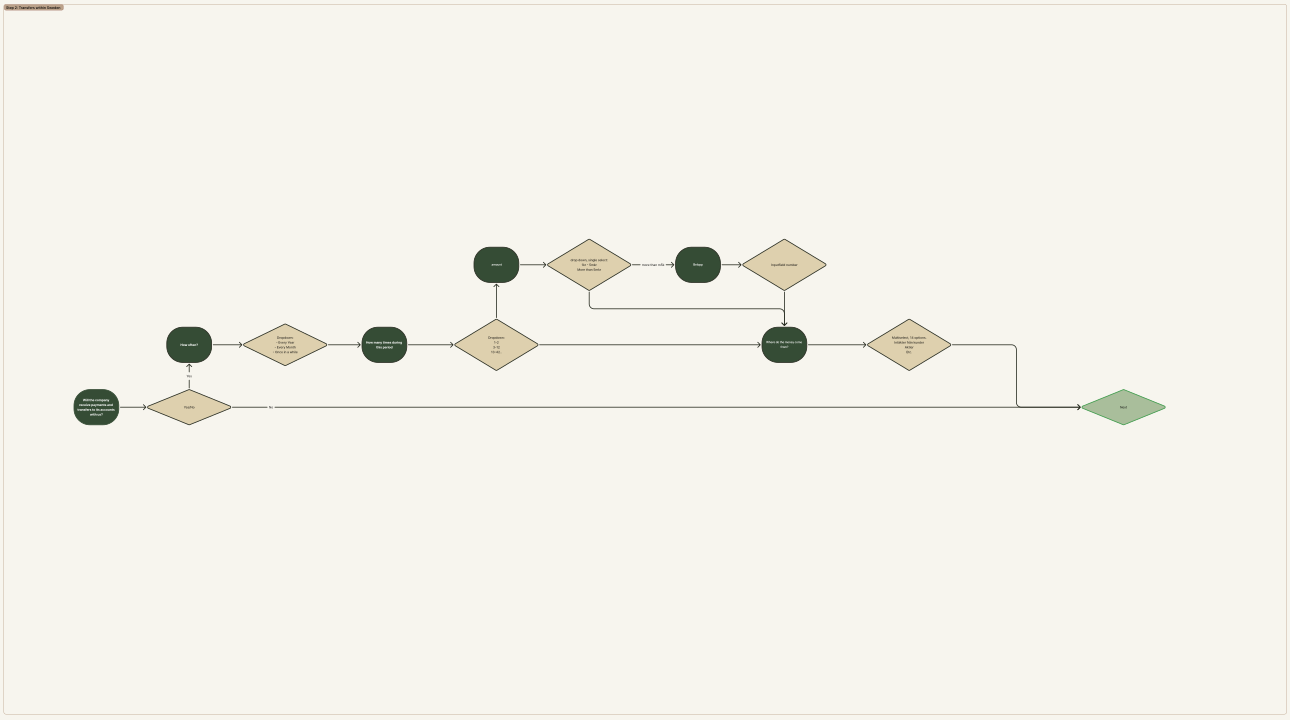
“My task as a designer was to bring it all together into an intuitive flow.”
My design approach04 / From logic to interface
A skeleton first.
Then the components.
With the flow mapped out, I translated it into SEB components. The work moved between question wording, help text, validation, conditional fields and how questions were grouped into steps.
I explored how to use the component library, avoid banking jargon and support accessibility. The goal was to make the questions understandable while retaining the information the bank needed.
05 / Overview without losing detail
The table holds the overview.
The slideout holds the task.
Countries, beneficial owners and signatories can each require a substantial amount of information. I used tables to keep those entries visible, with a status and clear actions for each item.
I placed the detailed questions in a slideout so customers could focus on one entry and then return to the overview. I made incomplete entries distinguishable from completed ones.
Beneficial owners
Recreated, anonymised design example| Beneficial owner | Ownership | Status | Actions |
|---|---|---|---|
| Person A, Person B | 26% | ◷ Incomplete | Edit |
| Person C | 26% | ✓ Complete | Edit |
Status is expressed with text and a symbol as well as colour.
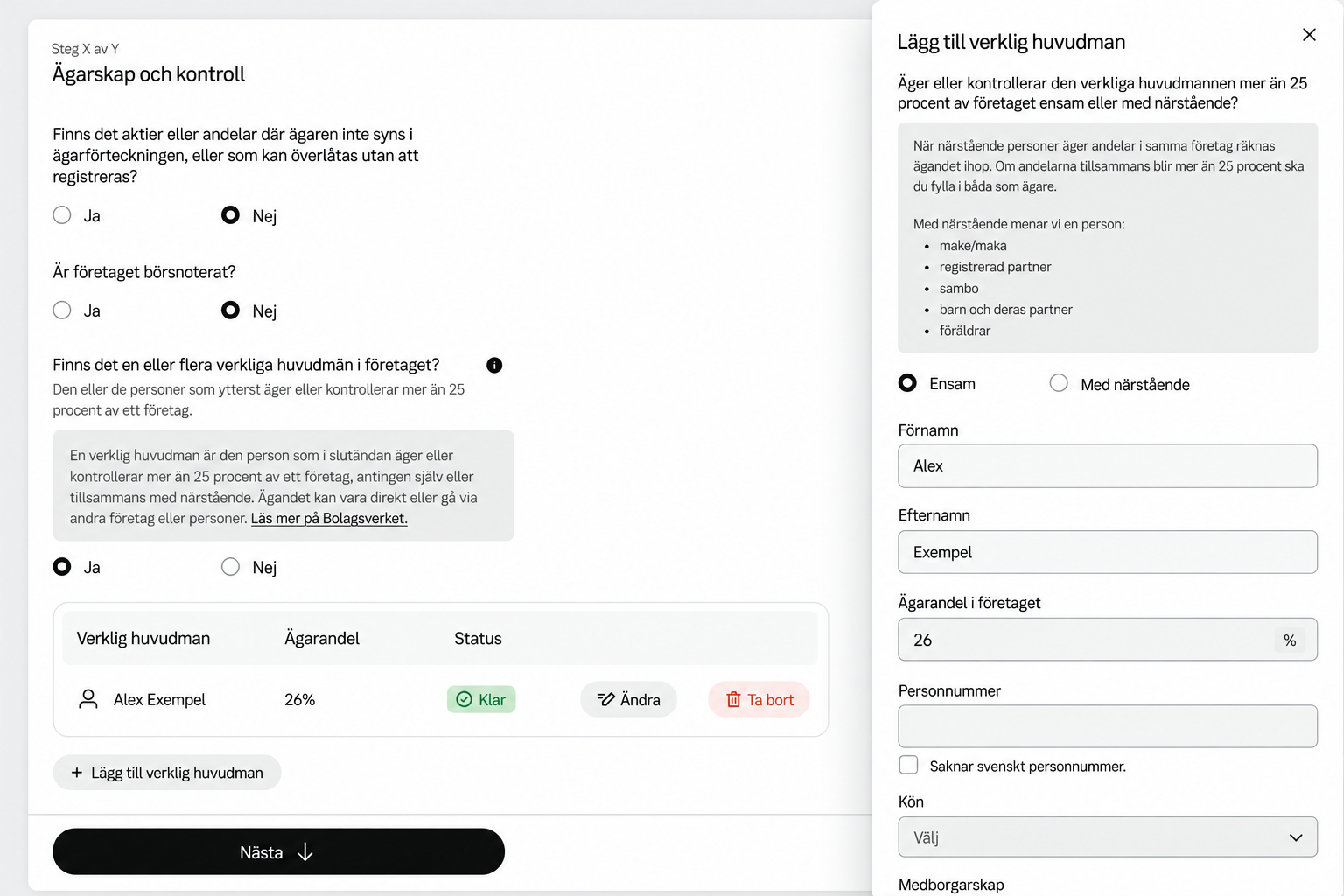
One owner at a time, with the overview in view.
I used the table to bring each owner or ownership group into one overview, showing their ownership share and completion status. I placed the detailed questions in a slideout so the customer could focus on one entry while keeping the surrounding ownership structure in view.
Rather than extending the main form with every owner’s details, I designed an add–edit–save pattern that could be repeated as the structure grew. After saving an entry, the customer could return to the table to review it or continue with the next owner.
Make progress visible
Show which entries need more information without opening each one.
Keep actions close
Place edit and remove actions beside the entry they affect.
Adapt for small screens
Use a compact table with shorter labels and icon actions while retaining the status.
06 / One entry at a time
Focused detail.
A clear way back.
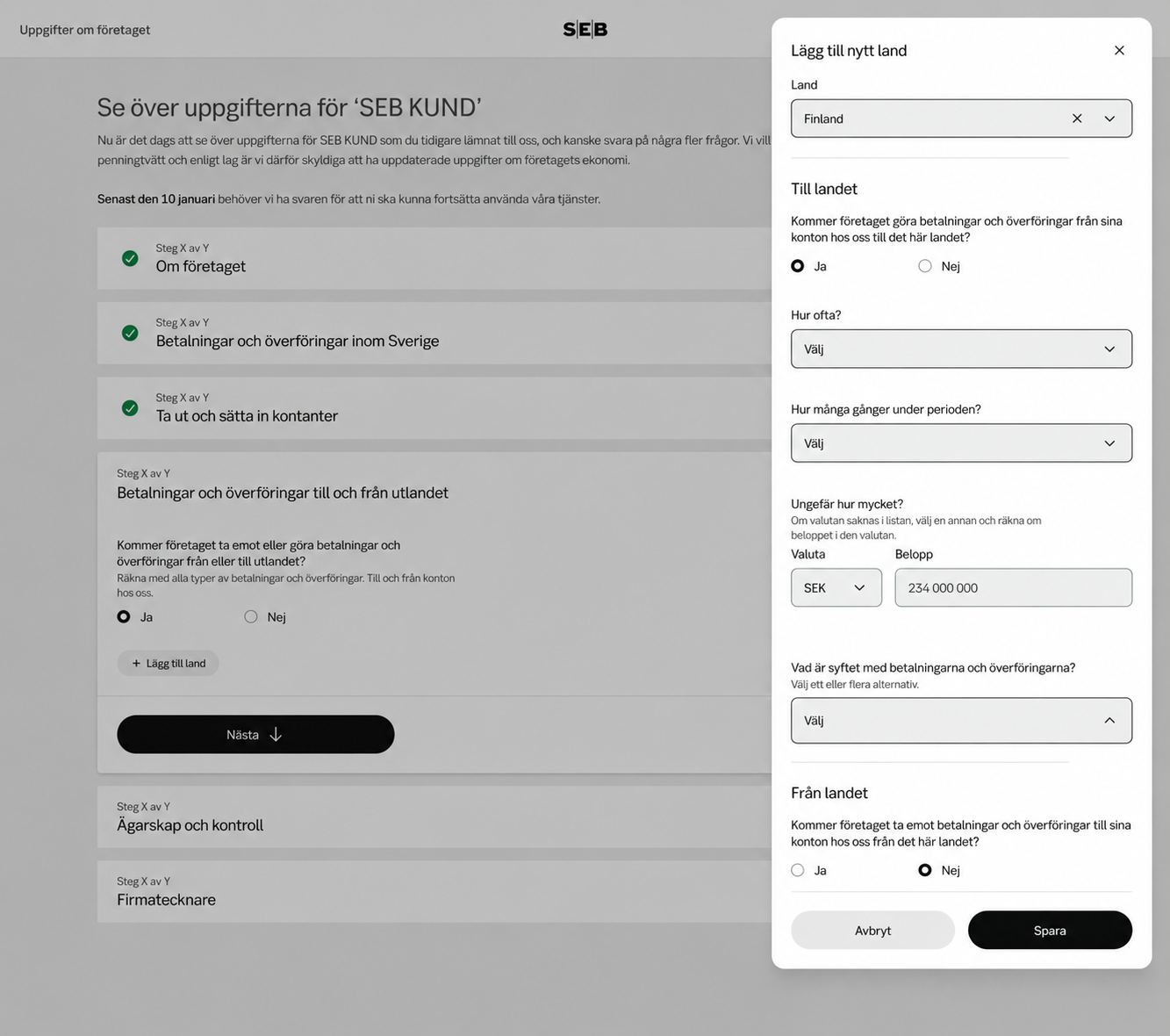
I kept each country visible in the main form and grouped its outgoing and incoming payment details in a slideout. This let me give the detailed questions space while preserving the customer’s place in the overall journey.
I also designed validation and confirmation states for missing information, cancelling changes and removing an entry.
07 / Helping customers recover
Validation belongs
in the journey.
The design includes errors beside individual fields and a summary that helps customers return to questions that need attention. At overview level, incomplete entries are flagged before the customer continues.
I worked through these states alongside the main flow so that missing information, editing and returning to a task were part of the design.
08 / Reflection
The visible form is only
one layer of the design.
I thought about the design as a set of connected layers. I worked through the components, wording, answer options, validation, conditions and question groups while considering the regulatory needs and the customer’s context.
The most valuable part of my process was making those layers visible to the people involved. Flowcharts connected the conversations; the interface translated that shared understanding into something a customer could work through.